
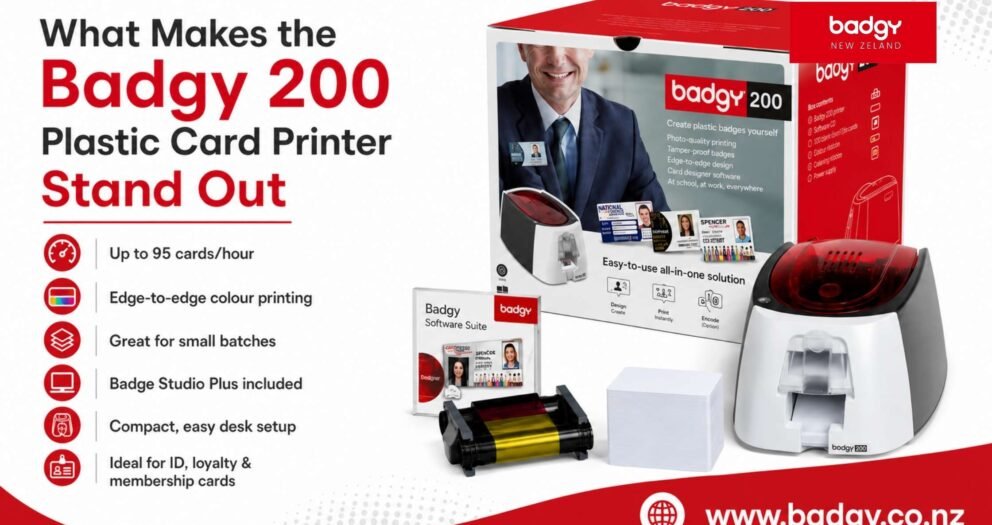
What Makes the Badgy 200 Plastic Card Printer Stand Out
For many modern organisations, plastic card printing is no longer a luxury. It has become a practical need for offices, schools, retail stores, gyms, clubs, associations, event companies, healthcare centres, and local organisations. Staff ID cards, visitor badges, loyalty cards, student cards, membership cards, and event passes all help businesses run more smoothly and look more professional.
In the past, many organisations outsourced plastic card printing because they believed professional cards required specialist equipment. However, outsourcing can be slow, expensive, and inconvenient when cards are needed regularly in small or medium quantities. A new employee may need an ID card immediately. A school may need replacement student cards. A retailer may want to issue loyalty cards on demand. A club may need membership cards every week.
This is where the badgy 200 plastic card printer stands out. It gives organisations the ability to print professional plastic cards in-house with speed, flexibility, and control. For New Zealand businesses, Badgy NZ provides access to Badgy 200 information, compatible consumables, templates, support resources, and product guidance, making it easier to manage plastic card printing without depending on external suppliers.
This mix of speed, card quality, and batch-printing support makes the Badgy 200 practical for regular workplace use.
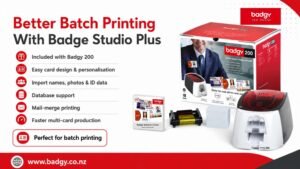 Badge Studio Plus also supports database features. Badgy NZ explains that the Plus version allows users to import databases and print in mail-merge mode. This is extremely useful when printing cards for multiple people. Instead of manually editing each card one by one, your team can import names, photos, ID numbers, or other details and print personalised cards more efficiently.
For example, a school can prepare student cards from a spreadsheet. A company can print employee ID cards using staff data. A club can print membership cards from a member list. An event organiser can create attendee badges from a registration file.
Badge Studio Plus also supports database features. Badgy NZ explains that the Plus version allows users to import databases and print in mail-merge mode. This is extremely useful when printing cards for multiple people. Instead of manually editing each card one by one, your team can import names, photos, ID numbers, or other details and print personalised cards more efficiently.
For example, a school can prepare student cards from a spreadsheet. A company can print employee ID cards using staff data. A club can print membership cards from a member list. An event organiser can create attendee badges from a registration file.
This flexibility makes the badgy 200 plastic card printer a strong choice for organisations that want one system for several card printing needs.
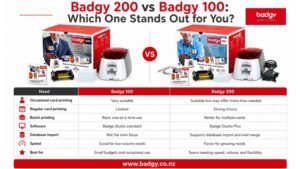
The Badgy 100 is a practical entry-level option, but the Badgy 200 stands out when a business needs faster printing, better batch handling, and more advanced software support.
Why the Badgy 200 Is Built for Modern Card Printing Needs
The badgy 200 printer is designed for organisations that need more than occasional one-card printing. It is ideal for businesses and teams that print cards regularly or need small batches throughout the year. Unlike basic paper badges or outsourced card orders, the Badgy 200 supports on-demand plastic card printing. This means your team can create personalised cards when they are needed, rather than waiting days for a print supplier. According to Badgy NZ, the Badgy 200 allows users to personalise and print several dozen or several hundred cards in one go. It also comes with Evolis Badge Studio Plus, which supports database importing and mail-merge printing. This makes it useful for organisations that need cards with different names, photos, ID numbers, departments, or membership details.Fast Printing That Saves Valuable Time
One of the biggest reasons the Badgy 200 stands out is its speed. Badgy NZ lists the Badgy 200 print speed at 38 seconds per card, or up to 95 cards per hour. For workplaces that need to print multiple cards, this can save a significant amount of time compared with slower printers or outsourced production. This speed is especially useful for:- Employee onboarding
- Student card printing
- Event registration
- Membership renewals
- Retail loyalty card programmes
- Visitor and contractor badge production
Edge-to-Edge Printing for a Professional Finish
A professional plastic card should look clean, branded, and high quality. The Badgy 200 supports edge-to-edge printing, which helps designs look more polished and complete. This is important for organisations that want their ID cards or membership cards to reflect their brand image. A card with strong branding can include your logo, colours, employee photo, department, QR code, barcode, and other important information. With better print coverage, the card looks less like a temporary badge and more like an official company or organisation card. This is one reason the badgy 200 id card printer is popular with businesses that want professional results without outsourcing.Badgy 200 Features at a Glance
| Feature | Badgy 200 Advantage |
| Print speed | Prints in about 38 seconds per card |
| Output capacity | Up to 95 cards per hour |
| Printing surface | Edge-to-edge printing for a polished look |
| Software | Evolis Badge Studio Plus with Excel connectivity |
| Batch printing | Suitable for several dozen or several hundred cards |
| Connectivity | USB connection for simple office setup |
| Card feeder | 25-card feeder capacity |
| Output hopper | 25-card output capacity |
| Eco-design | Extended standby mode and reduced electricity consumption |
| Common uses | ID cards, visitor badges, loyalty cards, memberships, event passes |
Better Batch Printing With Badge Studio Plus
A major advantage of the Badgy 200 is the included Evolis Badge Studio Plus software. This software helps users design and personalise plastic cards without needing advanced graphic design skills.
Badge Studio Plus also supports database features. Badgy NZ explains that the Plus version allows users to import databases and print in mail-merge mode. This is extremely useful when printing cards for multiple people. Instead of manually editing each card one by one, your team can import names, photos, ID numbers, or other details and print personalised cards more efficiently.
For example, a school can prepare student cards from a spreadsheet. A company can print employee ID cards using staff data. A club can print membership cards from a member list. An event organiser can create attendee badges from a registration file.
Easy Setup for Office Environments
The badgy 200 printer is designed to fit into normal workspaces. Badgy NZ lists its dimensions as 147 × 200 × 276 mm and weight as 1.7 kg, making it compact enough for an office desk, reception counter, school admin area, or membership desk. The printer uses USB 2.0 connectivity and is compatible with USB 1.1 and 3.0. This makes it simple to connect to a suitable computer and use like a dedicated card printing device. For many organisations, this matters because they do not want a complicated print room or large machine. They want a reliable card printer that can be used by admin teams, HR staff, receptionists, or membership managers.What Can You Print With the Badgy 200?
The Badgy 200 is flexible enough to support many card types. It is not limited to one industry or one use case.| Card Type | Ideal For |
| Staff ID cards | Offices, healthcare centres, schools, and corporate teams |
| Visitor badges | Reception areas and secure workplaces |
| Student cards | Schools, colleges, and training providers |
| Membership cards | Clubs, gyms, associations, and community groups |
| Loyalty cards | Retail stores, cafes, salons, and service businesses |
| Event badges | Conferences, workshops, exhibitions, and local events |
| Access cards | Workplaces needing clear role or access identification |
| Business cards | Durable branded cards for networking |
Better Control Over Branding
When you outsource card printing, you often need to send designs, request changes, approve proofs, and wait for production. If you later update your logo, colours, staff details, or layout, you may need to place another order. With the Badgy 200, your organisation keeps control of the design process. You can update your card design whenever your branding changes. You can create different card layouts for staff, visitors, VIP members, volunteers, students, or contractors. This is helpful for businesses that want consistent branding across their physical and digital touchpoints. A well-designed plastic card can match your website, signage, uniforms, brochures, and customer experience.Improved Data Privacy and Security
Plastic cards often contain personal or business-sensitive information. Staff ID cards may include employee photos, names, job titles, departments, and ID numbers. Membership cards may include member details. Student cards may include school records or identification numbers. When printing is outsourced, some of this information may need to be shared with a third-party supplier. With in-house printing, your organisation can keep more of that data under internal control. The badgy 200 id card printer helps businesses issue and replace cards quickly while reducing unnecessary external handling of personal information. This is especially useful for schools, healthcare facilities, offices, clubs, and organisations that care about privacy and security.Why the Badgy 200 Is Better Than Paper or Laminated Cards
Paper passes and laminated cards may seem affordable, but they often do not deliver the same professional result. Paper can tear, fade, bend, or look temporary. Laminated cards can be time-consuming to prepare and may not have the same polished finish as direct plastic card printing. The Badgy 200 prints directly onto plastic cards, helping create a more durable and professional result. Plastic cards are better suited for daily use, customer programmes, staff identification, and membership systems. For organisations that want to look more professional, this difference matters. A high-quality plastic card feels official and creates a stronger impression than a paper pass.Compatible Cards and Consumables
Badgy NZ provides consumables for Badgy printers, including cards and ribbons designed to support better print quality. The FAQ section explains that Badgy printers can use PVC, PVC composite, PVC laminated, and PET cards. It also states that Badgy accepts ISO CR80 bank-card format cards measuring 86 × 54 mm, with thickness between 0.50 mm and 0.76 mm. Using compatible consumables is important because it helps improve print quality and protect the printer. Badgy NZ recommends using Badgy consumables because they are designed to optimise print quality and extend the life of badges and the printer.Badgy 200 vs Badgy 100: Which One Stands Out for You?
Badgy NZ offers both Badgy 100 and Badgy 200 options. The right choice depends on how often your organisation prints cards.
| Need | Badgy 100 | Badgy 200 |
| Occasional card printing | Very suitable | Suitable but may offer more than needed |
| Regular card printing | Limited | Strong choice |
| Batch printing | Basic one-at-a-time use | Better for multiple cards |
| Software | Badge Studio standard | Badge Studio Plus |
| Database import | Not the main focus | Supports database import and mail merge |
| Speed | Good for low-volume needs | Faster for growing needs |
| Best for | Small budgets and occasional use | Teams needing speed, volume, and flexibility |
Who Should Choose the Badgy 200?
The Badgy 200 is a smart choice for organisations that print cards regularly or expect their card printing needs to grow. It is especially useful for:- Medium-sized businesses
- Schools and educational organisations
- Retail stores with loyalty programmes
- Clubs and membership groups
- Event organisers
- Healthcare clinics
- Local organisations
- Offices with regular onboarding
- Teams managing visitors or contractors
Why Choose Badgy NZ?
Badgy NZ is a valuable choice for New Zealand organisations looking for practical plastic card printing solutions. The website provides information about the Badgy solution, Badgy 100, Badgy 200, consumables, card templates, FAQs, technical support, and where to buy. Choosing Badgy NZ means your organisation can access a focused product range designed for plastic card printing. Instead of relying on general office printing options, you can choose a system made specifically for personalised plastic cards and badges. Reasons to choose Badgy NZ include:- Clear product information for Badgy 100 and Badgy 200
- Support for staff ID cards, visitor badges, loyalty cards, memberships, and event cards
- Compatible cards, ribbons, and consumables
- Access to card template resources
- Helpful FAQs and setup support
- Practical solutions for New Zealand businesses, schools, clubs, and organisations
- Options for both occasional and regular card printing needs